Oh so there is a proper name for this ! I have had those once in a while since I was a kid, and still get them well into my forties.
I do still remember the anxiety the first time it happened.
Oh so there is a proper name for this ! I have had those once in a while since I was a kid, and still get them well into my forties.
I do still remember the anxiety the first time it happened.
He manages to toot his own horn and be completely tone-deaf in a single sentence.
He does take portals in the games. But he is quite vocal about hating them.
KeePass features a built-in synchronization mechanism. I store my password file on google drive for ease of access on multiple devices. I set up triggers (on save, on custom button) to sync between the local copy and the cloud copy, using this guide: https://keepass.info/help/kb/trigger_examples.html#dbsync
Not a turnkey solution, but once setup it works like a charm.
This game looks like a major flop in the making. It seems like they are trying to appeal to the Fortnite crowd with those flashy visuals and style.
Overall they are making some weird moves with Horizon, trying to expand it into a multi-genre license. This is a lot to put on a game which could have been a one-shot with a powerful story. The sequel felt kind of forced story-wise and don't get me started about its ending.
Sysinternals (winternals) tools are so useful ! There is something for everyone there (TcpView, ProcExp are my personal go-tos). MS was well inspired to buy it and hire M. Russinovich.
DRG never fails to impress. One of my favorite mission-based coop games of all time (along with Helldivers 2 and Vermintide 2). I'll be dabbling into some Ossuary exploration for sure.
Quick let's rebrand LibreOffice to LibrePilot ! Wait no it's already taken. And also a braindead move.
I got a lot of mileage off my SD with Steamworld games, and they are very cheap right now : SteamWorld Essentials
And if you're in the mood for puzzle platformers, the Trine games run beautifully : Trine: Ultimate Collection
I opted into the prod_slim beta and it works as advertised. 22.01 GB on my SSD and the game is running the same as before, as far as I can tell.
It's unlikely you can prevent install or remove entire features when Microsoft does not want you to. Depends on how baked-in they make it. More often than not it's a game of whack-a-mole where you find out what toggles are available that disable stuff you do not want.
My launch LCD Steam Deck is unfortunately now afflicted with a power button issue. It amounts to the power button being unresponsive ~9 times out of 10 (and getting worse). It has been reported on, but has no definitive fix as far as I can tell.
My fixes attempt so far have been:
This is an in-depth analysis of the problem : [https://www.youtube.com/watch?v=OAZtSyyx-ww]
Did someone try a lasting fix for the issue without soldering ? Maybe putting a piece of plastic or electrical tape between the button and the switch helps (like in [https://www.youtube.com/watch?v=JhwThw6Ke-U]) ?
Edit 26/04/2025: I put a piece of electric tape between the button and the switch. and there is a very tangible improvement. Not every button press works but most of them do so far. I'll see about the longevity of this fix.

Now that my Steam Deck LCD has been relieved of his duties as a daily driver desktop PC, I finally went ahead and replaced the Delta fan with a Huaying one. It turned out to be relatively easy to do ; and lo and behold, it is indeed quieter.
Recent adopters may or may not know there was a medium-sized kerfuffle about disparities in noise profiles of early Steam Deck units. It was proved and narrowed down to a difference between 2 fan models (see Gamers Nexus detailed analysis).
Obviously the one I got was a "bad" one, emitting a high pitched noise when running at full speed. I did not find it unbearable but it was still not ideal, particularly when using the SD in quiet environments.
Took me 2 years to get to the point where I figured it was an acceptable risk to attempt the replacement. How many of you did the same and kicked the Delta out of your unit ?

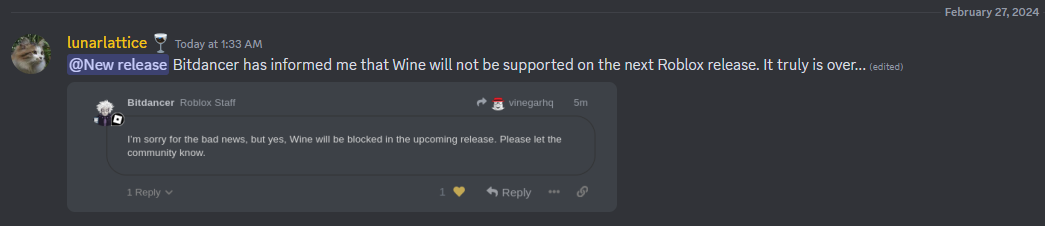
Well, shit. Unfortunate news from the Vinegar Discord: Roblox will block Wine in future releases.
This is going to end my "Steam Deck as a primary desktop PC for my kid" experiment.
I have searched for such a game, featuring both realistic driving and open world roaming.
I settled on BeamNG.drive which can do that out of the box, even though it's capable of much more. While it lacks the high quality environments of the Forza Horizons it has very good wheel and even VR support and is simply the best automobile sandbox around.