Can’t make the wrong people look bad.
An unofficial chapter of the popular Dull Men's Club.
1. Relevant commentary on your own dull life. Posts should be about your own dull, lived experience. This is our most important rule. Direct questions, random thoughts, comment baiting, advice seeking, many uses of "discuss" rarely comply with this rule.
2. Original, Fresh, Meaningful Content.
3. Avoid repetitive topics.
4. This is not a search engine
Use a search engine, a tradesperson, Reddit, friends, a specialist Facebook group, apps, Wikipedia, an AI chat, a reverse image search etc. to answer simple questions or identify objects. Also see rule 1, “comment baiting”.
There are a number of content specific communities with subject matter experts who can help you.
Some other communities to consider before posting:
5. Keep it dull. If it puts us to sleep, it’s on the right track. Examples of likely not dull: jokes, gross stuff (including toes), politics, religion, royalty, illness or injury, killing things for fun, or promotional content. Feel free to post these elsewhere.
6. No hate speech, sexism, or bullying No sexism, hate speech, degrading or excessively foul language, or other harmful language. No othering or dehumanizing of anyone or negativity towards any gender identity.
7. Proofread before posting. Use good grammar and punctuation. Avoid useless phrases. Some examples: - starting a post with "So" - starting a post with pointless phrases, like "I hope this is allowed" or “this is my first post” Only share good quality, cropped images. Do not share screenshots of images; share the original image.
.
Can’t make the wrong people look bad.
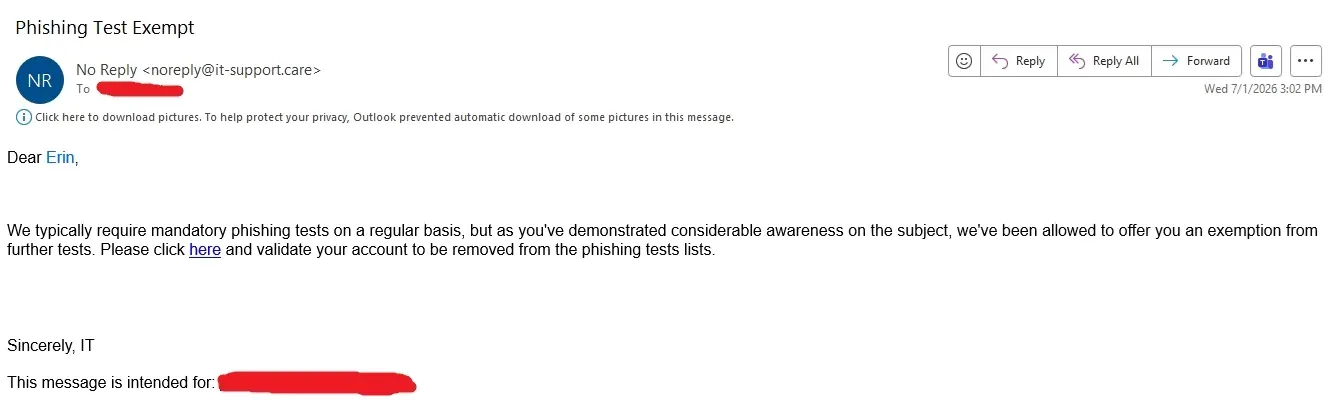
Being able to bypass the automated filtering is entirely logical, because they are testing and training humans and not the spam filters.
They are training you to be the next line of defense after the automated filters are defeated. Which is, obviously, a thing which does happen frequently - eg, in every real phishing attack which succeeds.
There is some truth to that, but on the other hand at any large enough organization many people will still fail these tests. And, even if you're sure that you're too smart for them, don't you think that being periodically subjected to these tests probably does actually make some people a bit more cautious?
I'm usually really good about security, but even I once failed one of the tests. I was doing some work for the city with Wells Fargo and was expecting an email from them, and that week's phishing test was a fake Wells Fargo email, and it got me.
It taught me that nobody is immune from fucking up.
I got tricked by a phishing test once, because I had raised a ticket with IT about an unrelated issue. They sent me a fucking phishing test link that looked like it came from IT Help Desk, while I was on the phone with the IT Help Desk person that I had called. Like I literally initiated every single communication, so it’s not like a “hey this is {fake IT} calling and I need you to install this exe for me” cold call that happened to get lucky.
The Help Desk tech was like “okay I’m sending you a link to {program installer}, then once it’s downloaded I can remote into your laptop and install it with admin rights.” The “hey we need you to click this link” phishing email from {Fake IT Help Desk} chose that exact moment to hit my inbox. Again, I had called IT, using an internal company phone system, using a direct phone extension that I had looked up in our internal company directory. So it’s not like there was any reason for me to distrust the tech or suspect that he was actually a phisher. The actual email with the real link arrived like a minute after I had already failed the test.
Even the Help Desk tech was like “okay, that’s actually the first time I’ve ever heard of someone failing a phishing test while actively talking to IT… Did they really send that at the same time I said I was sending my email?? Bro you got swindled… At least the training videos will give you a chance to eat lunch at your desk?”
Well if just clicking on a link counts as "gotcha" then consider me guilty as charged. Because I've been unsure about the underlying URL and wanted to know what page loads. But my web browser is jailed. My point is: you didn't get phished until you give away any info other than "someone received the email and clicked on the link"
Never heard of drive-by malware attacks? Malicious ads? Zero-click attacks? That link is Schrödinger’s zero-day ransomware attack, which may or may not exist. And there’s no way for you to know which it is, until after you’ve already clicked it. Sandboxing your browser is fine, but they weren’t testing to see if your browser would allow an attack to happen. They were testing to see if you would allow an attack to happen.
The actual method of attack (and any protections you have set up for your browser) is irrelevant, because they’re not testing to see if your browser is hardened. If they were going to do a software audit to see if browsers were vulnerable, you probably wouldn’t ever even hear about it. Because IT would handle it directly, via the access they already have to your company computer.
Tricking you into disclosing sensitive info is only one specific type of attack. The phishing link isn’t checking to see if you’d give info away. If they were testing that, they could do it in other ways, like a fake email from your manager asking for the info. No need to click a link to fail that test. But with the phishing link, you fail the test when you click it because it ultimately doesn’t matter what loads after you click the link. That link exists in a quantum state where every single piece of malware that ever did/will exist can load as soon as you click it.
To consider an employee clicking on a potentially malicious link as "allowing an attack to happen" takes a special kind of incompetence on the part of the IT (security) team.
If simply clicking a link compromises a system, that's on corporate IT, not on the user. As you say, "they weren't testing to see if your browser would allow an attack to happen". Because - in a corporate setting - if it would, they done fucked up. And if it wouldn't, then clicking a link alone is no problem.
I dislike that you incite me to respond to that because I don't want to insult you personally, but I have very strong feelings about this attitude. This particular, take from a corporate IT department, is moronic. If clicking a link to check where it leads compromises IT security, that is 100% the fault of corporate IT. That is what they must fix with firewalls and filter policies.
As an IT security responsible, if you push responsibility for single keypress actions to the user, you are an idiot, and a liability to your company's IT security, and you should not be allowed anywhere near a sensitive system or policy.
The role of IT security is not to set legal frameworks in which when a fuckup happens, a responsible person that is not them can be found. The role of IT security is to protect the intranet and users from external attacks, be it hacking or phishing or malware - and to protect the same intranet from internal attacks in the best way feasible. That includes a user intentionally clicking a link if that is sufficient to compromise intranet systems.
About the only thing you can make users responsible for is to not disclose information through phishing or social engineering attacks, and to not intentionally sabotage anything.
The point is to have multiple layers of protection. With users who are vigilant it's less likely for something to get through even if IT fails to filter out an attack.
Think of it like gun safety. Even though a gun is unloaded you don't aim it at someone.
No argument there - training cybersecurity awareness is fine, but singling users for clicking on a link alone is moronic. Most security fuckups in my experience result from stupid IT policies and rarely do the responsible admins / managers ever get flak for their fuckups.
In my experience (I'm not in IT), the IT folks only get recognized for fuckups. When they do things right nobody notices and thinks they're a waste of money, resulting in the company cutting back on their budget then freaking out when they're not equipped to do their job and something goes wrong.
Ok let me rephrase: IT management never gets the flak they often deserve.
But also there's a distinction to be made between competent IT and IT service contracts where the contract officers are corrupt and/or incompetent and then the service is awful as a whole.
funny thing is that our company masks all links in emails and routes them via an internal security shield solution. so you have no chance to actually see what the url is until you click on it. if it was a training email you get to waste 20 minutes watching a training video and i suspect if it would be actual phish the shield would probably not catch it.
Oh yeah our moronic IT service does this too - mutilating links for dumb users, sabotaging the work of power users :(
Some mail providers will show you a link preview on click or on hover.
So does my email client. I meant I might be curious if a URL seems well forged, e.g. woth Unicode characters.
Having a few of those phishing test emails actually get snagged by the spam filters wouldn't actually a bad idea. I can review the quarantined and spam email for the rare case there is a false positives, and it's entirely possible that someone could find something in there, be like "hey that looks legit", and get phished.
Though on the subject of spam filters, I really wish IT would invest some resources into some better filtering. I mean, it's the first line of defense and from what I can tell they just use some default crappy Microsoft filter that barely catches anything and lets some of the spammiest spam just sail right through. So I guess in that sense not letting the fake phishing emails get snagged by the filters is entirely believable.