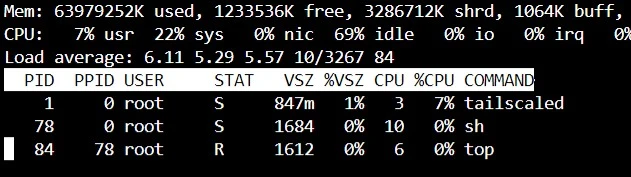
I tried to delete and recreate the container, but there's still this insane power consumption.
For comparison, cloudflared doing a tunnel to hundreds of users takes 0.06% of CPU time on the same server
A place to share alternatives to popular online services that can be self-hosted without giving up privacy or locking you into a service you don't control.
Rules:
Be civil.
No spam.
Posts are to be related to self-hosting.
Don't duplicate the full text of your blog or readme if you're providing a link.
Submission headline should match the article title.
No trolling.
Promotion posts require active participation, with an account that is at least 30 days old. F/LOSS without a paywall has exceptions, with requirements. See the rules link for details. Tags [CBH] or [AIP] are required, see the links in Rule 8 for details.
AI-related discussions and AI-involved promotional posts have additional requirements for tagging, as noted in Rule 7 and the AI & Promotional Post Expanded Rules post, and find example disclosures here.
Resources:
Any issues on the community? Report it using the report flag.
Questions? DM the mods!
I tried to delete and recreate the container, but there's still this insane power consumption.
For comparison, cloudflared doing a tunnel to hundreds of users takes 0.06% of CPU time on the same server
On my machine it's consuming about 0.5% - 1.0% of cpu time, which is higher than zerotier in the same machine (almost zero).
Tailscale does a lot more things than just tunneling though. For example, on default installation it'll catch all outbound dns request on the machine and route them through MagicDNS (100.100.100.100).
That's weird. I closed the docker on that specific machine (ryzen 5), copied the docker-compose directory (=same config) on an i5-6500T and now it's using just 0.1% of CPU time.
Go back to ryzen and it's 8% again 🤷
One thing you could try doing if you feel up to it is to build Tailscale from source code. Often when built for your specific machine, performance improves.
I just checked my AMD box and tailscale there can consume ~15% of cpu time when the tunnel is under active use. When it's not used it's ~1.5%. But it's a low power old AMD cpu though (AMD G-T56N), so I'm not use if it compares to Ryzen 5. On my intel machine, it's ~5% when under active use, and idle at ~0.5%.
Isn't CPU % is per thread?