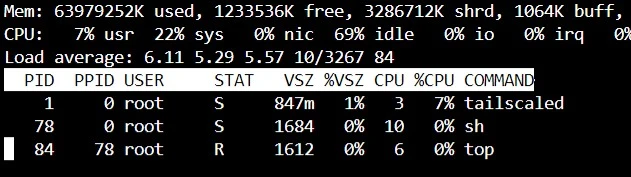
I tried to delete and recreate the container, but there's still this insane power consumption.
For comparison, cloudflared doing a tunnel to hundreds of users takes 0.06% of CPU time on the same server
A place to share alternatives to popular online services that can be self-hosted without giving up privacy or locking you into a service you don't control.
Rules:
Be civil.
No spam.
Posts are to be related to self-hosting.
Don't duplicate the full text of your blog or readme if you're providing a link.
Submission headline should match the article title.
No trolling.
Promotion posts require active participation, with an account that is at least 30 days old. F/LOSS without a paywall has exceptions, with requirements. See the rules link for details. Tags [CBH] or [AIP] are required, see the links in Rule 8 for details.
AI-related discussions and AI-involved promotional posts have additional requirements for tagging, as noted in Rule 7 and the AI & Promotional Post Expanded Rules post, and find example disclosures here.
Resources:
Any issues on the community? Report it using the report flag.
Questions? DM the mods!
I tried to delete and recreate the container, but there's still this insane power consumption.
For comparison, cloudflared doing a tunnel to hundreds of users takes 0.06% of CPU time on the same server
On my machine it's consuming about 0.5% - 1.0% of cpu time, which is higher than zerotier in the same machine (almost zero).
Tailscale does a lot more things than just tunneling though. For example, on default installation it'll catch all outbound dns request on the machine and route them through MagicDNS (100.100.100.100).
That's weird. I closed the docker on that specific machine (ryzen 5), copied the docker-compose directory (=same config) on an i5-6500T and now it's using just 0.1% of CPU time.
Go back to ryzen and it's 8% again 🤷
I just checked my AMD box and tailscale there can consume ~15% of cpu time when the tunnel is under active use. When it's not used it's ~1.5%. But it's a low power old AMD cpu though (AMD G-T56N), so I'm not use if it compares to Ryzen 5. On my intel machine, it's ~5% when under active use, and idle at ~0.5%.
One thing you could try doing if you feel up to it is to build Tailscale from source code. Often when built for your specific machine, performance improves.
Isn't CPU % is per thread?
Why is your system load >5 with such little CPU usage? Seems like there is a lot of i/o on your system.
If it's network traffic going over your VPN that could explain it.
Because that's a docker container on a "busy" server (mostly WordPress wasting cycles generating pages for some bots that really have to visit my blog over and over and over and over)
(Top from inside the container)
you might want to look into getting wordpress to generate static pages and only deliver the static html.
Overall using bloging tools that generate static pages is better than constantly requesting DB and dynamically compiling each page every time there is a request
Yeah it's a long time that I wanted to migrate to Hugo
The main issue is that a decade ago or so, I hosted a vibrant forum with the stupidest platform ever, bbpress. So my WordPress has something like 30k pages...
time to do some perf profiling